Open Source & Self-HostedDocker Swarm, from 1 server to a cluster

Your own Heroku.
On your servers.

Deploy apps, databases and functions on servers you own — from a single VPS to a whole cluster, with SSL, backups and autoscaling built in. Your data never leaves your servers, and your apps keep running even if HivePaaS stops.

$
curl -fsSL https://get.hivepaas.com | sudo bash
⚡ One command, any major Linux distro•🪶 ~300 MB control plane
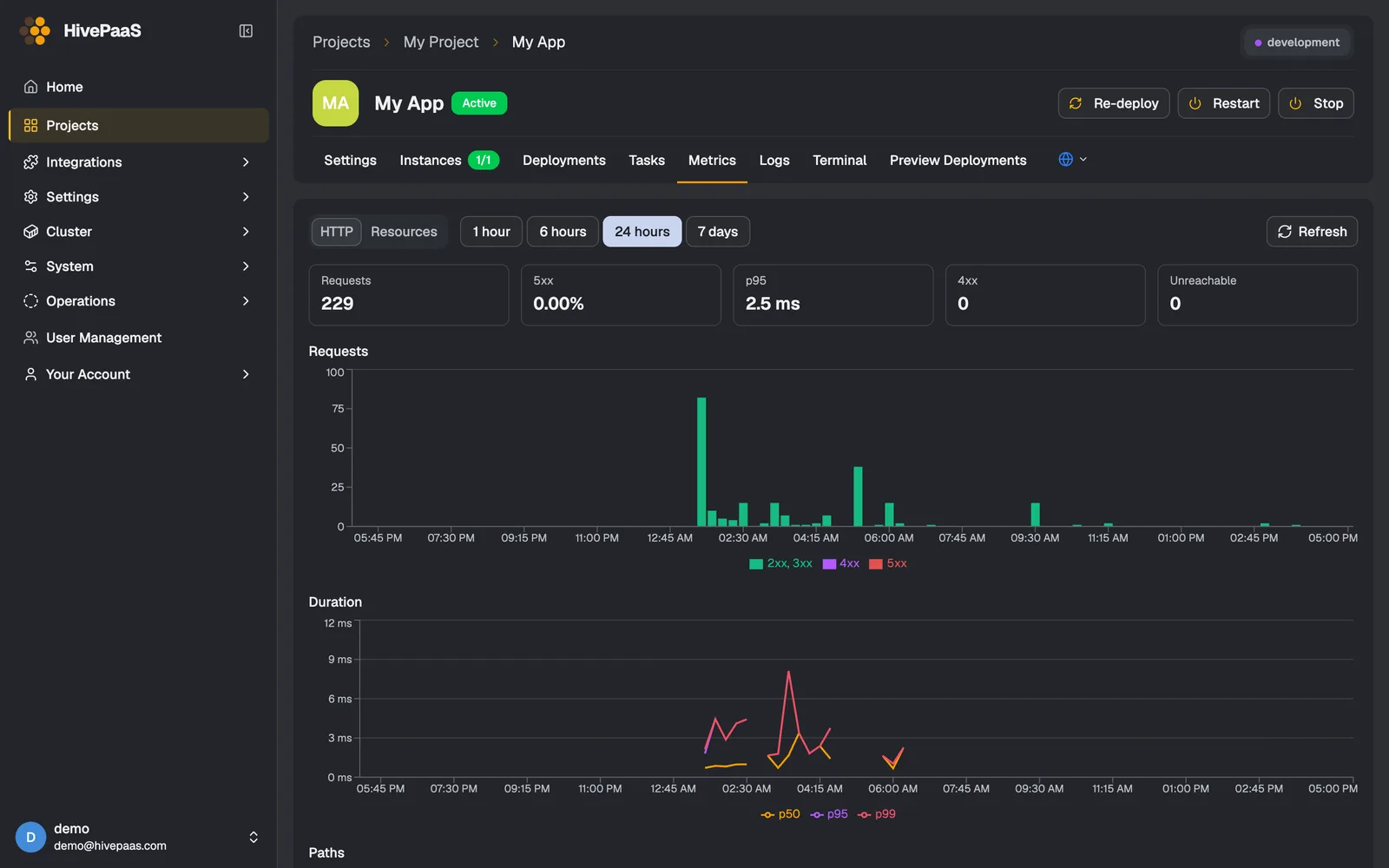
HivePaaS app metrics: requests, 5xx rate, p95 latency and a duration chart over 24 hours
Requests, errors and latency of every app, measured on the node by eBPF — no SDK in your code.

Try HivePaaS Live in Your Browser

Experience the dashboard, manage Swarm services, and test deployments on our public live demo clusters — no installation required.

Demo Server 01

demo1.hivepaas.com
Online
Username
demo
Password
HivePaaS@2026
Launch Demo 1

Demo Server 02

demo2.hivepaas.com
Online
Username
demo
Password
HivePaaS@2026
Launch Demo 2

Everything an app needs in production

Deployments, previews, logs and terminals are the start. These are the parts teams usually have to bolt on themselves — in HivePaaS they come built in.

Functions

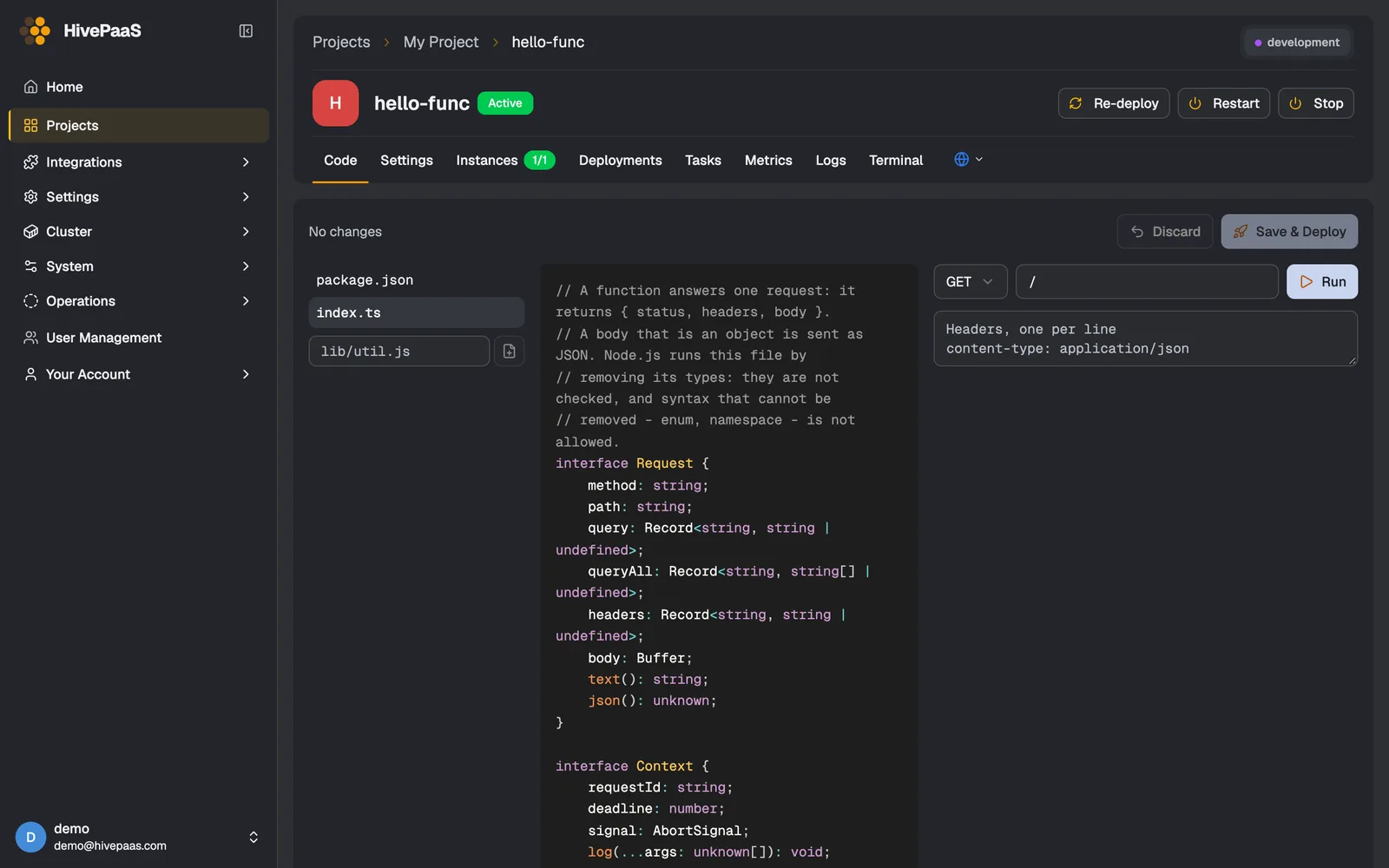
Write a handler, not a server. HivePaaS builds it on its runtime and calls it once per request — over HTTPS, inside the project, or on a schedule.

  • Node.js & TypeScript, Bun, Python, Go
  • Edit and run in the browser, or build from Git
  • Scales on its calls
Read the docs →

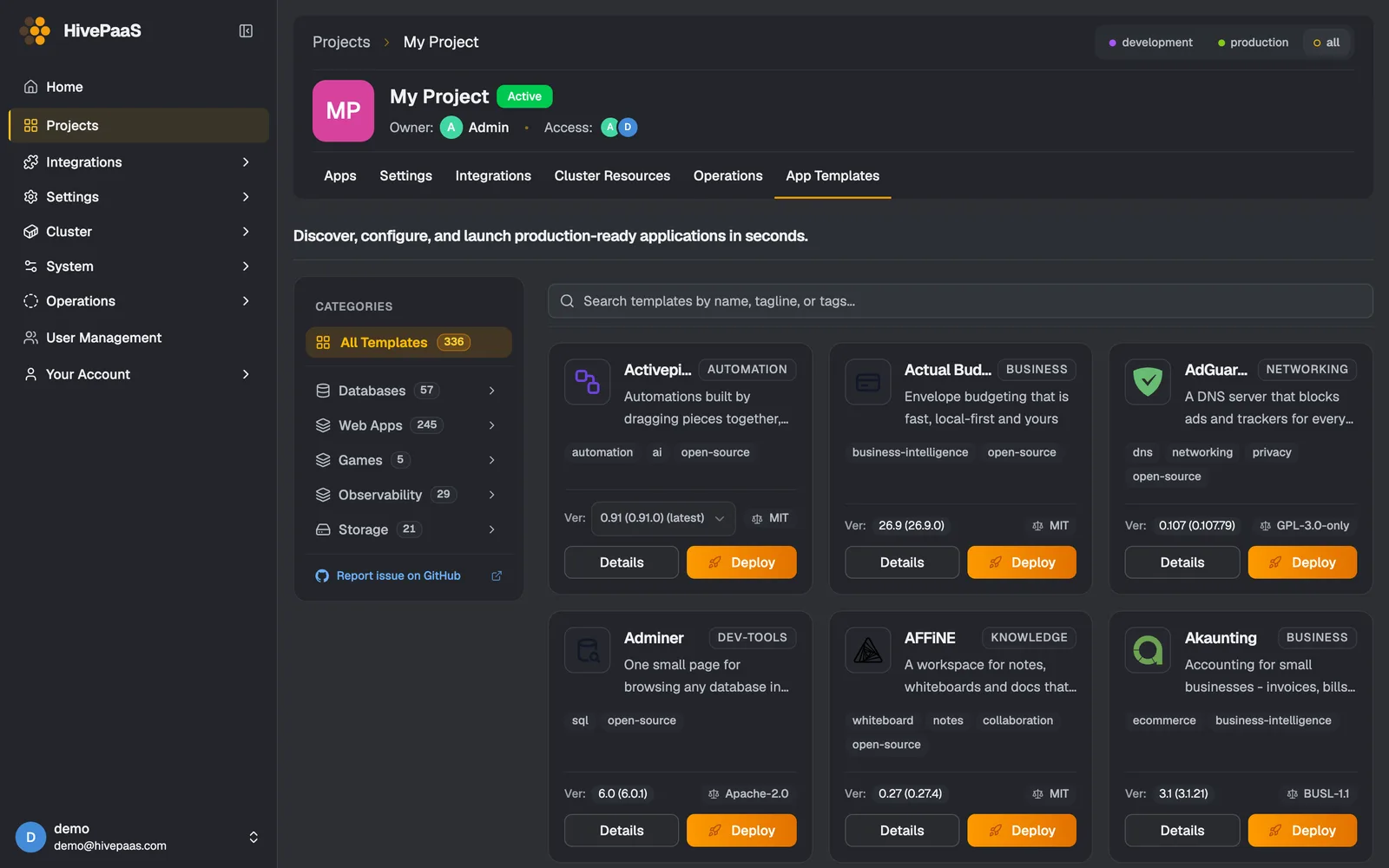
App Store, 300+ templates

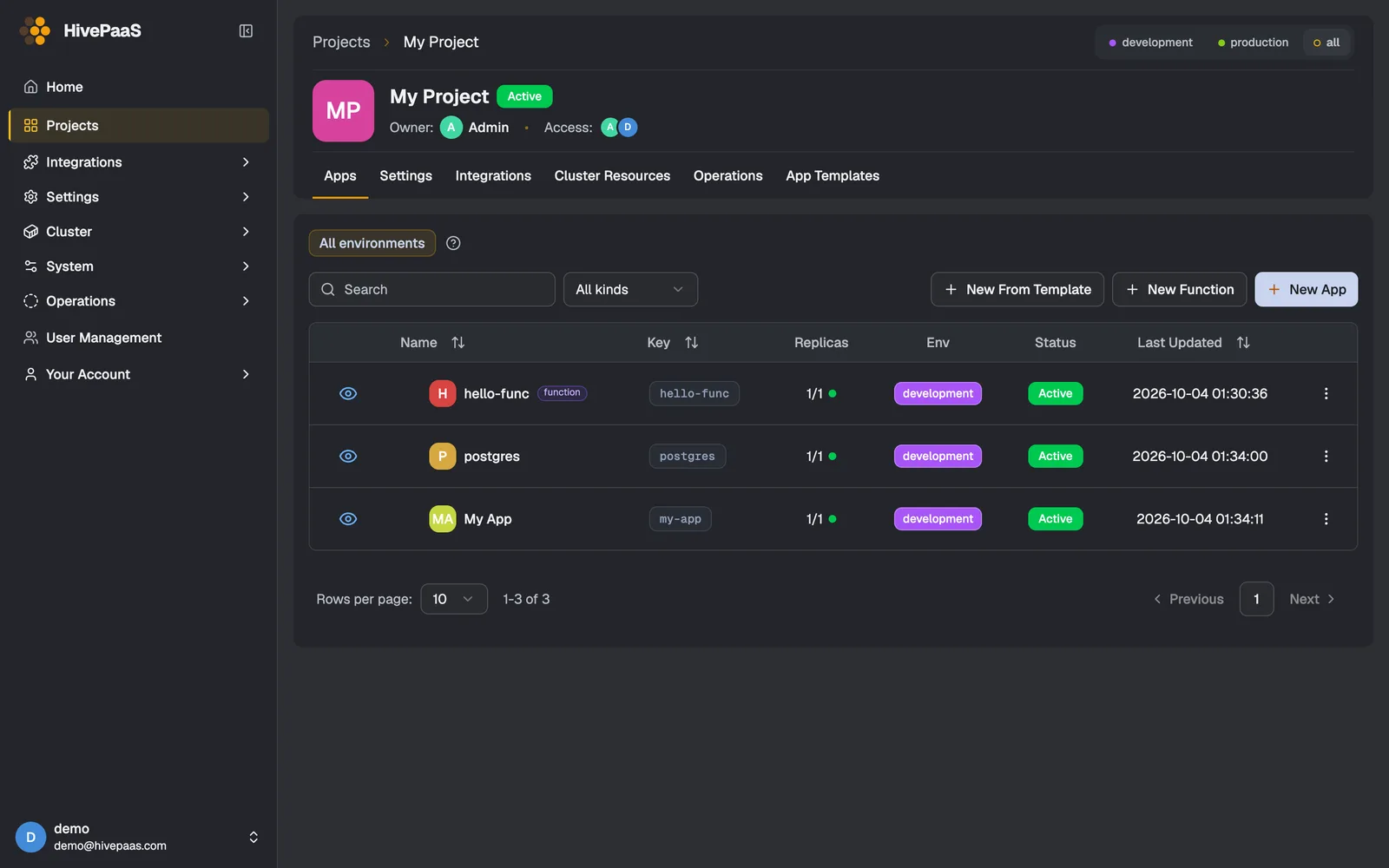
PostgreSQL, Redis, WordPress, n8n, Grafana, Ollama and hundreds more. A template knows its image, storage, health check and the apps it needs.

  • Databases, CMSs, analytics, AI tools
  • Parameters with sensible defaults
  • Versions you pick
Read the docs →

Backups you can restore

Volumes and databases backed up on a schedule with Kopia: encrypted, deduplicated and compressed, so a daily backup of a large volume stays small.

  • AWS S3, Cloudflare R2, Backblaze B2, MinIO
  • Or a volume on one of your nodes
  • Restore from the dashboard
Read the docs →

Autoscale & metrics

Replicas follow the load — requests, CPU or both — between the limits you set. Requests, errors and latency are measured by eBPF on the node, with no SDK in your code.

  • Checks the load every 15 seconds
  • Up to 50 replicas per app
  • Per-path and per-call metrics
Read the docs →

Domains & SSL

Point a domain at your server and HivePaaS routes it through Traefik, with Let's Encrypt certificates issued and renewed on their own.

  • Wildcard certificates through your DNS provider
  • Redirects, rate limits, basic auth, allowed IPs
  • Bring your own certificate
Read the docs →

AI assistants, through MCP

Let Claude, Codex, Gemini, Cursor or Copilot find out why an app is down, read its logs, or install an app — within what its API key may do.

  • Read-only unless you allow changes
  • Shows every change before making it
  • Never deletes anything
Read the docs →

A Modern Bento Architecture for Cloud Independence

Built from the ground up to give developers the agility of high-end PaaS without sacrificing infrastructure control.

✨ Architectural SuperpowerZero Vendor Lock-in

Unbreakable Apps: If HivePaaS Stops, Your Services Keep Running.

HivePaaS deploys every app as a standard native Docker Swarm service. If you ever uninstall or stop HivePaaS, every container, proxy route, and database continues running without a single dropped packet.

Docker Swarm Native Service Mesh State
HivePaaS EngineUninstalled / Offline
Control plane removed
➔
Next.js Web App100% Running
Serving traffic on :443
PostgreSQL 18100% Running
Cluster Volume intact
🛡️ Privacy First

100% Data Sovereignty

Zero telemetry, zero external tracking. Your source code, encryption keys, and customer databases remain strictly inside your own virtual private servers.

TelemetryNone
Secret EncryptionAge / AES-256
Backup TargetKopia → S3 / volume
⚡ Pure Go Core

~300 MB Control Plane

Written in Go. HivePaaS's whole control plane — API, agent, database, Redis and Traefik — runs in about 300 MB, leaving the rest of your server to your apps. A typical Kubernetes control plane, built for far larger clusters, starts at around a gigabyte.

HivePaaS
~300 MB
K8s control plane
~1 GB+
🔍 Git-Ops & PreviewsInstant Staging

Ephemeral PR Previews & Instant Git Deployments

Every Pull Request automatically provisions an isolated staging container with its own temporary subdomain. Preview features with clients and teammates before merging to production.

Git
Push to PR #42
Build
Dockerfile Build
Live
https://pr-42.myapp.net
🐳 Multi-Node Swarm1-Click Scale

Effortless Multi-Server Clustering

Scale your application across multiple worker nodes anywhere in the world. Add a new worker VPS with a single join token — no networking PhD required.

Worker Join Command:docker swarm join --token SWMTKN-1-49... 192.168.1.10:2377
Manager (Leader)10.0.0.1
CPU: 4% • RAM: 280MB
Worker Node 0110.0.0.2
4 Containers • RAM: 512MB
Worker Node 0210.0.0.3
6 Containers • RAM: 720MB

The right tool for the job

Kubernetes and managed cloud platforms are excellent at what they are built for. Here is how HivePaaS compares — including where each of them is the better choice.

Platform Capability
HivePaaSSelf-Hosted Swarm
Kubernetes (K8s)Enterprise Cluster
Cloud PaaSHeroku / Render
Target Cluster Scale
The cluster size each is designed for
1 – 50 Nodes (SMB Sweet Spot)🏆 1,000+ Nodes (Hyperscale)Set by your plan
Operating Effort
Expertise needed to operate it
✓ No specialist neededA platform team is typical✓ Fully managed for you
Idle Memory Overhead
RAM consumed by control plane at 0 load
✓ ~300 MB RAM~1 GB+ (control plane, typical)Managed by the provider
Entry Infrastructure Cost
Minimum monthly server budget
✓ Any VPS, from ~$5 / moVaries by distribution / cloudUsage-based plans
Ecosystem & Extensibility
What you can run and plug in
✓ Any Docker image + 300+ templates🏆 Massive (CNCF & CRDs)✓ Curated add-on marketplace
Cluster Node Autoscaling
Adding servers as the load grows
Join a node with one command✓ Native Cluster Autoscaler✓ Handled by the provider
Data Sovereignty
Customer databases strictly on your own servers
✓ Full Privacy & Control✓ Full Privacy & ControlIn the provider's cloud
Portability
What your apps run on underneath
✓ Plain Swarm services✓ Standard K8s resourcesRuns on the provider's platform
Ephemeral App Previews
Automated preview URLs for every Git PR
✓ Built inThrough CI or add-on tools✓ Built in
Open Source Freedom
Source code access & self-hosting rights
✓ 100% Open Source✓ Open SourceCommercial service

Choosing a self-hosted PaaS

Self-hosting has a great open-source community, and HivePaaS is glad to be part of it. These projects are excellent too — try them, and pick the one that fits the way you work.

Where HivePaaS puts its focus

  • Functions next to your apps: Node.js & TypeScript, Bun, Python and Go
  • Autoscaling on requests or CPU, and request metrics measured by eBPF
  • Projects with their own environments, and access per project and per module
  • Encrypted, deduplicated backups with Kopia, to S3-compatible storage
  • An MCP server, so AI assistants can work with your cluster safely
  • Apps that keep running even when HivePaaS itself is stopped

Engineered for Teams Who Value Speed, Cost & Autonomy

Eliminate DevOps friction whether you are building your first SaaS or scaling a dozen production client services.

🏢 Cut Cloud Bills

Startups & SMBs

Run your entire backend, databases, and microservices on high-performance $10 - $40 VPS servers. Save up to 80% on cloud bills without hiring a full-time DevOps engineer.

✓No surprise cloud billing surges
✓Your data never leaves your servers
✓High availability Docker Swarm clustering
👨‍💻 Most PopularSolo Builders

Solo Devs & Indie Hackers

Ship fast, test ideas with instant preview links, and host 20+ side projects on a single $5/month VPS. Manage databases, cron jobs, and domains from one central dashboard.

✓1-Click Postgres, MySQL, Redis, ClickHouse
✓Automatic Let's Encrypt HTTPS / SSL
✓In-browser container file & terminal manager
👥 Client Delivery

Software Agencies

Manage isolated client environments with zero hassle. Spin up ephemeral preview environments for client reviews, and deliver clean Docker Swarm setups without proprietary lock-in.

✓Ephemeral PR previews for client sign-offs
✓Isolated dev / staging / prod environments
✓Effortless client handoff with pure Docker

From Fresh Server to Production in 3 Simple Steps

No complicated infrastructure-as-code or lengthy manual configuration.

01

Run 1-Line Installer

SSH into a clean Linux server — Debian, Ubuntu, RHEL, Fedora, Alpine and more — and run the installer. HivePaaS auto-initializes Docker Swarm, Traefik proxy, and SSL.

curl -fsSL https://get.hivepaas.com | sudo bash
02

Connect Git or Templates

Link your GitHub/GitLab repository or pick 1-click templates for PostgreSQL, Redis, MySQL, Node.js, Go, or Python.

GitHub WebhooksPostgreSQLRedisNode.js
03

Deploy, Preview & Scale

Your apps go live with automated SSL certificates. Test pull requests with instant ephemeral previews, and scale nodes with 1-click.

✓Auto Let's Encrypt HTTPS
✓Zero Downtime Rolling Update
✓Multi-Node Ready

Questions, answered

Something else on your mind? Ask on Discord or read the documentation.

Why Docker Swarm, and not Kubernetes?

Kubernetes is the right tool for very large clusters and teams that run a platform of their own. Most apps run on one to a few dozen servers, and there Docker Swarm does the job with much less to learn and to run: it is built into Docker, it takes little memory, and a single server is already a working cluster. HivePaaS adds what Swarm lacks on its own — builds, domains, certificates, backups, metrics and a dashboard.

What happens to my apps if HivePaaS stops?

They keep running. Each app is a plain Docker Swarm service, and Traefik keeps routing their domains from Swarm itself. While HivePaaS is down you only lose the dashboard and the work it drives, such as deployments, backups and scheduled jobs; they resume when it starts again.

Can I run it on a single server?

Yes. HivePaaS installs on one Linux server, which becomes the manager of a swarm, and more servers can join it later as workers. 4 CPUs, 8 GB of memory and a 40 GB disk are recommended; it runs on less, with less room left for your apps.

Which Linux distributions does it support?

Debian, Ubuntu and their derivatives; Fedora, RHEL, CentOS, Rocky Linux, AlmaLinux, Oracle Linux and Amazon Linux; SLES and openSUSE; Arch and Manjaro; and Alpine. The installer sets up Docker itself when it is missing.

Is HivePaaS free?

Yes, you can install it and use it for free today. Paid plans with wider limits, and an edition for larger organizations, are on the way — they will be announced on this page.

Where does my data live?

On your servers, and nowhere else. HivePaaS sends no telemetry. Backups go where you send them: a bucket on S3-compatible storage of your choice, or a volume on one of your nodes, encrypted with the repository’s password.

Can I try it before installing?

Yes. Sign in to one of the live demo servers above with the read-only demo account, and look around a real cluster: apps, functions, metrics, logs and the app store.

Deploy on Your VPS in 60s

Take Full Control of Your Applications
Without the DevOps Tax.

Open source, self-hosted, and free to start. Deploy on any server with zero vendor lock-in — your containers will always belong to you.

$curl -fsSL https://get.hivepaas.com | sudo bash